Ext1:本文源码解析基于 mybatis-spring-boot-starter 2.1.1,即 mybatis 3.5.3 版本。 Ext2:本文主要是对源码的讲解,着重点会是在源码上。 一、从 MybatisAutoConfiguration 说开去,map…
Ext1:本文源码解析基于 mybatis-spring-boot-starter 2.1.1,即 mybatis 3.5.3 版本。
Ext2:本文主要是对源码的讲解,着重点会是在源码上。
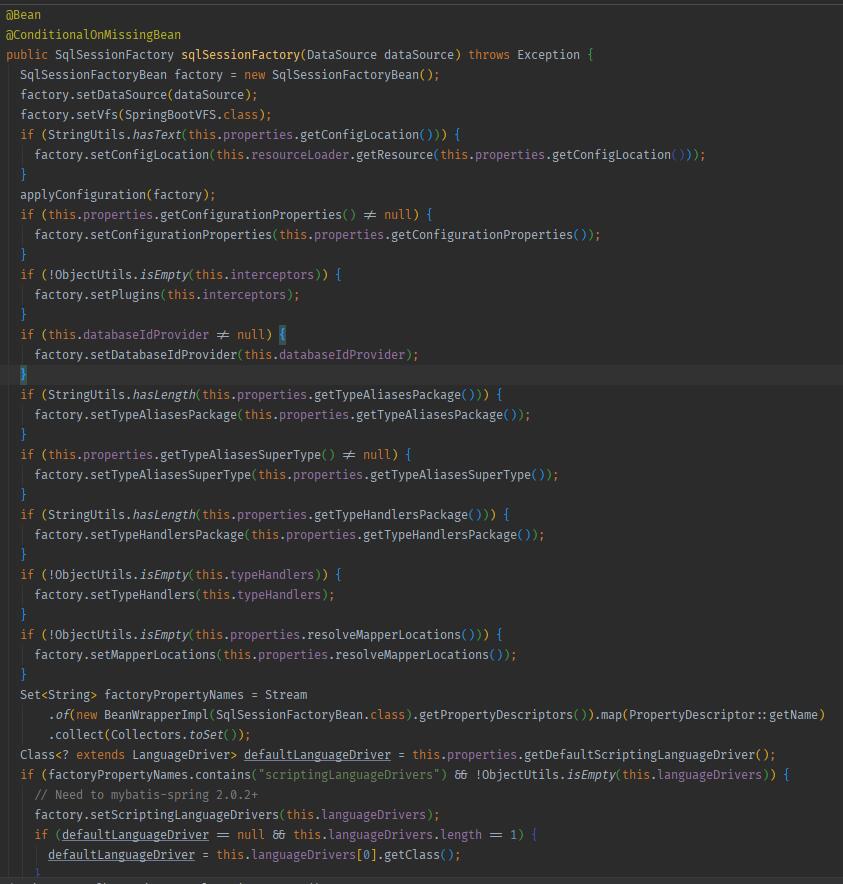
一、从 MybatisAutoConfiguration 说开去,mapper 文件是怎么扫描的 我们知道配置 SqlSessionFactory 是我们集成 Mybatis 时需要用到的常客, SqlSessionFactory 顾名思义是用来创建 SqlSession 对象的, SqlSession 对象的重要程度不言而喻。源码中提到, SqlSession 是 Mybatis 运行最重要的一个接口,通过此接口,我们可以进行我们的操作指令,获取 mapper ,管理事务等操作。SqlSessionFactoryBean 进行 sqlSessionFactory 的创建。
1
2
3
4
5
6
7
8
9
10
11
12
13
14
15
16
17
18
19
20
21
22
23
24
25
26
27
28
29
30
31
32
33
34
35
36
37
38
39
40
41
42
43
44
45
46
47
48
49
50
51
52
53
54
55
56
57
58
59
60
61
62
63
64
65
66
67
68
69
70
71
72
73
74
75
@Bean public SqlSessionFactory sqlSessionFactory () { SqlSessionFactoryBean factoryBean = new SqlSessionFactoryBean (); factoryBean.setDataSource(dataSource()); return factoryBean.getObject(); } `我们可以拿到这个```text SqlSessionBean `来进行我们一些定制化操作,比如```text mybatis插件 `,自定义的返回处理等等。如果我们不显式声明```text SqlSessionFactory `,则会使用 mybatis-spring-boot-autoconfigure 下的这个```text bean ``` 的注册: )) { factory.setMapperLocations(this .properties.resolveMapperLocations()); } `它的实现实际上非常简单:拿到我们所有的```text mapperLocations `这个数组,解析成```text Resource `数组。```text -- 来自代码 org.mybatis.spring.boot.autoconfigure.MybatisProperties#resolveMapperLocations -- public Resource[] resolveMapperLocations() { return Stream.of(Optional.ofNullable(this .mapperLocations).orElse(new String [0 ])) .flatMap(location -> Stream.of(getResources(location))).toArray(Resource[]::new ); } private Resource[] getResources(String location) { try { return resourceResolver.getResources(location); } catch (IOException e) { return new Resource [0 ]; } -- application.yml中的配置 -- mybatis: mapper-locations: classpath*:com/anur/mybatisdemo/test/mapper
configurationElement 就是对我们
xml 文件的解析,通过
parser.evalNode("/mapper") 拿到我们编写的
xml 的
<mapper> 标签进行初步的解析,源码如下:可以看到许多熟悉的身影,比如
namespace 、
resultMap 、
select|insert|update|delete 之类的。
1
2
3
4
5
private void configurationElement (XNode context) {try { String namespace = context.getStringAttribute("namespace" ); if (namespace == null || namespace.equals("" )) { throw new BuilderException ("Mapper's namespace cannot be empty" );
}
1
2
3
4
5
6
7
8
9
builderAssistant.setCurrentNamespace(namespace); cacheRefElement(context.evalNode("cache-ref")); cacheElement(context.evalNode("cache")); parameterMapElement(context.evalNodes("/mapper/parameterMap")); resultMapElements(context.evalNodes("/mapper/resultMap")); sqlElement(context.evalNodes("/mapper/sql")); buildStatementFromContext(context.evalNodes("select|insert|update|delete")); } catch (Exception e) { throw new BuilderException("Error parsing Mapper XML. The XML location is '" + resource + "'. Cause: " + e, e);
}
给一个简单的```text xml看一下```text
1
2
3
4
5
6
7
8
9
10
11
12
13
14
15
16
17
18
19
20
21
22
23
24
25
26
27
28
29
30
31
32
33
34
35
36
mybaits `封装的这套```text XNode `可以使得我们访问```text xml `像访问```text map `一样轻松:```xml <?xml version="1.0" encoding="UTF-8" ?> <!DOCTYPE mapper PUBLIC "-//mybatis.org//DTD Mapper 3.0//EN" "http://mybatis.org/dtd/mybatis-3-mapper.dtd"> <mapper namespace="com.anur.mybatisdemo.test.TrackerConfigMapper"> <select id="getAllFollower" parameterType="hashmap" resultMap="customMap"> select * from tracker_config where in_use = 1 <if test="followerId != null">and user_id = #{followerId}</if> </select> <select id="getFollower" resultType="com.anur.mybatisdemo.test.pojo.TrackerConfigDO"> limit 1 <resultMap id="customMap" type="com.anur.mybatisdemo.test.pojo.TrackerConfigDO"> <result column="user_d" property="userId"/> <result column="in_use" property="inUse"/> <association property="config" resultMap="customMap"/> </resultMap> </mapper> ``` ##### 三、ResultMap 是如何解析的
方才说到,
configurationElement() 方法负责对
xml 文件进行解析,我们拿几个主要的元素出来讲讲,比如
resultMap :
1
2
3
4
5
6
7
8
9
10
11
12
13
14
15
16
17
18
19
20
21
22
23
24
25
26
27
28
29
30
31
32
33
34
35
36
37
38
39
40
41
42
43
44
45
46
47
48
49
50
51
52
53
54
55
``` 就是解析 `resultMap` 的入口,同样的,先拿到 `resultMap` 这个 XML 节点,进入到 `resultMapElements` 这个方法, `resultMapElements` 负责解析 `xml` ,最后,将解析的结果交给 `ResultMapResolver` 处理。 我们先忽略 `ResultMapResolver` ,简单看看 `resultMapElement` 中做了什么,对应的源码如下,大体可分为两类解析: private ResultMap resultMapElement(XNode resultMapNode, List<ResultMapping> additionalResultMappings, Class<?> enclosingType) throws Exception { ErrorContext.instance().activity("processing " + resultMapNode.getValueBasedIdentifier()); String type = resultMapNode.getStringAttribute("type", resultMapNode.getStringAttribute("ofType", resultMapNode.getStringAttribute("resultType", resultMapNode.getStringAttribute("javaType")))); Class<?> typeClass = resolveClass(type); if (typeClass == null) { typeClass = inheritEnclosingType(resultMapNode, enclosingType); } Discriminator discriminator = null; List<ResultMapping> resultMappings = new ArrayList<>(); resultMappings.addAll(additionalResultMappings); List<XNode> resultChildren = resultMapNode.getChildren(); for (XNode resultChild : resultChildren) { // 循环解析子标签 if ("constructor".equals(resultChild.getName())) { processConstructorElement(resultChild, typeClass, resultMappings); } else if ("discriminator".equals(resultChild.getName())) { discriminator = processDiscriminatorElement(resultChild, typeClass, resultMappings); } else { List<ResultFlag> flags = new ArrayList<>(); if ("id".equals(resultChild.getName())) { flags.add(ResultFlag.ID); } resultMappings.add(buildResultMappingFromContext(resultChild, typeClass, flags)); } String id = resultMapNode.getStringAttribute("id", resultMapNode.getValueBasedIdentifier()); String extend = resultMapNode.getStringAttribute("extends"); Boolean autoMapping = resultMapNode.getBooleanAttribute("autoMapping"); ResultMapResolver resultMapResolver = new ResultMapResolver(builderAssistant, id, typeClass, extend, discriminator, resultMappings, autoMapping); try { return resultMapResolver.resolve(); } catch (IncompleteElementException e) { configuration.addIncompleteResultMap(resultMapResolver); throw e; } `一种是对```text resultMap `本身属性的解析,也就是```text getStringAttribute `,例如当前```text `的```text type `是什么,它是否开启```text autoMapping `,```text id ``` 是什么之类的。 一种则是对子标签的解析,子标签的解析,则分为 `constructor` 、 `discriminator` 、以及其他字段的解析。
如图所示:
1
2
3
###### 3.1 ResultMap 中的重要成员:typeHandler ```javascript 在 `mybatis` 对 `MySQL` 返回的结果集 `resultSet` 进行解析时, `typeHandler` 有着举足轻重的作用。 `MySQL` 的 `JdbcType` 有很多,比如 `BLOB` , `VARCHAR` , `DATE` 等等,而我们的 java 类型( `mybatis` 称之为 `javaType` ,或者 `javaTypeClass` )也很多,还包括我们很多的 自定义的 `TypeHandler` ,这里就不赘述了。
那么必然存在一个问题,如何将它们一一对应上?毫无疑问, JdbcType 可以被解析为多个 javaTypeClass ,如 VARCHAR 可以对应解析成我们的 JSON JAVA BEAN ,也可以解析为 String 等等;同样, String 类型也可以由多个 JdbcType 解析而来,比如 DATE 类型可以经过一定规则的解析,成为 String 类型的时间。org.apache.ibatis.type.TypeHandlerRegistry 。
1
2
3
4
5
public TypeHandlerRegistry () { register(Boolean.class, new BooleanTypeHandler ()); register(boolean .class, new BooleanTypeHandler ()); register(JdbcType.BOOLEAN, new BooleanTypeHandler ()); register(JdbcType.BIT, new BooleanTypeHandler ());
1
2
3
register(Byte.class, new ByteTypeHandler ()); register(byte .class, new ByteTypeHandler ()); register(JdbcType.TINYINT, new ByteTypeHandler ());
1
2
3
register(Short.class, new ShortTypeHandler ()); register(short .class, new ShortTypeHandler ()); register(JdbcType.SMALLINT, new ShortTypeHandler ());
1
2
3
register(Integer.class, new IntegerTypeHandler ()); register(int .class, new IntegerTypeHandler ()); register(JdbcType.INTEGER, new IntegerTypeHandler ());
1
2
register(Long.class, new LongTypeHandler ()); register(long .class, new LongTypeHandler ());
1
2
3
register(Float.class, new FloatTypeHandler ()); register(float .class, new FloatTypeHandler ()); register(JdbcType.FLOAT, new FloatTypeHandler ());
1
2
3
register(Double.class, new DoubleTypeHandler ()); register(double .class, new DoubleTypeHandler ()); register(JdbcType.DOUBLE, new DoubleTypeHandler ());
……..
1
2
3
4
`TypeHandlerRegistry` 中注册了许多 `javaTypeClass` -> `JdbcType` 的映射,内部维护了一个变量 ```text private final Map<Type, Map<JdbcType, TypeHandler<?>>> typeHandlerMap = new ConcurrentHashMap<>(); ```
当我们获取某个 TypeHandler 时,先根据 javaTypeClass 获取到 Map<JdbcType, TypeHandler<?> ,然后再根据 JdbcType 获取到具体的 TypeHandler 。
1
2
3
4
5
例如,对于 `javaTypeClass` : `java.util.Date` 来说,默认有三种映射,分别是: ```json null -> DateTypeHandler "TIME" -> TimeOnlyTypeHandler "DATE" -> DateOnlyTypeHandler
源码中,优先根据```text jdbcType获取,如果获取不到,则使用兜底的配置,也就是默认的text TypeHandler `,代码如下:java
1
2
3
private <T> TypeHandler<T> getTypeHandler (Type type, JdbcType jdbcType) {if (ParamMap.class.equals(type)) { return null ;
}
1
2
3
4
5
6
Map<JdbcType, TypeHandler<?>> jdbcHandlerMap = getJdbcHandlerMap(type); TypeHandler<?> handler = null; if (jdbcHandlerMap != null) { handler = jdbcHandlerMap.get(jdbcType); // 优先根据 `jdbcType` 获取 if (handler == null) { handler = jdbcHandlerMap.get(null);// 否则获取默认的,key 为 null
}
1 handler = pickSoleHandler(jdbcHandlerMap);
}
1 // type drives generics here
1 return (TypeHandler<T>) handler;
}
1
2
3
4
5
6
7
8
9
10
11
12
13
14
15
16
17
18
19
20
21
22
23
24
25
26
27
28
29
30
31
32
33
34
35
36
37
38
39
40
41
42
43
44
45
46
47
48
49
50
51
52
53
54
55
56
57
58
59
60
61
62
63
64
65
66
67
68
69
70
71
72
73
74
###### 3.2 mapper.xml 配置与 typeHandler 上面只是说了 `typeHandler` 的获取,那么又是如何从 `mapper` 文件解析出我们需要的 `typeHandler` 呢?这里直接上结论,再一一解析。  上图看起来好像复杂,实际上解析过程十分简单,遵循以下几个获取顺序: 优先获取 xml 配置的 `typeHandler` ,自己配置的 `typeHandler` 优先级最高 若果没有配置,则需要从刚才讲的那个 `TypeHandlerRegistry` 中,通过 `javaTypeClass` + `jdbcType` 获取 如果 `javaTypeClass` 为空则使用 `Object.class` 类型作为 `javaTypeClass` 如果 `jdbcType` 为空则获取默认的 `typeHandler` `javaTypeClass` 也有自己的获取权重,顺序如下: 优先获取 xml 配置的 `javaType` 否则根据 `property` + `resultType` 根据反射来获取 3.2.1 typeHandler 的获取顺序 源码也很容易看明白,先通过 xml 文件获取 `typeHandler` == org.apache.ibatis.builder.xml.XMLMapperBuilder#buildResultMappingFromContext == String typeHandler = context.getStringAttribute("typeHandler"); Class<? extends TypeHandler<?>> typeHandlerClass = resolveClass(typeHandler); `比如对于下面这个xml,update_time 这一属性,会优先使用```text Date2StrTypeHandler `来进行解析。```xml <result column="user_id" property="userId"/> <result column="update_time" property="updateTime" typeHandler="com.anur.mybatisdemo.Date2StrTypeHandler"/> `紧接着,如果 xml 中指定了```text typeHandler `,则创建一个```text `实例,如果没有指定,则```text `会在下一步骤进行创建。```text == org.apache.ibatis.builder.BaseBuilder#resolveTypeHandler(java.lang.Class<?>, java.lang.Class<? extends org.apache.ibatis.type.TypeHandler<?>>) == protected TypeHandler<?> resolveTypeHandler(Class<?> javaType, Class<? extends TypeHandler<?>> typeHandlerType) { if (typeHandlerType == null) { } // javaType ignored for injected handlers see issue #746 for full detail TypeHandler<?> handler = typeHandlerRegistry.getMappingTypeHandler(typeHandlerType); // not in registry, create a new one handler = typeHandlerRegistry.getInstance(javaType, typeHandlerType); } return handler; } `没有手动指定```text `,那么则会使用```text javaTypeClass `+```text JdbcType `共同来定位一个```text `,也就是调用```text typeHandlerRegistry.getTypeHandler(resultMapping.javaType, resultMapping.jdbcType) `这个方法,此方法在本文 2.1.1 有提到过```text == org.apache.ibatis.mapping.ResultMapping.Builder#resolveTypeHandler == private void resolveTypeHandler() { if (resultMapping.typeHandler == null && resultMapping.javaType != null) { Configuration configuration = resultMapping.configuration; TypeHandlerRegistry typeHandlerRegistry = configuration.getTypeHandlerRegistry(); resultMapping.typeHandler = typeHandlerRegistry.getTypeHandler(resultMapping.javaType, resultMapping.jdbcType); } `3.2.2 javaTypeClass 的获取顺序```text `也是一样的道理,先是优先从 xml 中获取:```java String javaType = context.getStringAttribute("javaType"); Class<?> javaTypeClass = resolveClass(javaType); `比如下面这个 xml 的 userId 这一属性,```text `就是```text Integer ```xml ```html <result column="user_id" property="userId" javaType="java.lang.Integer"/>
但是如果我们不指定,源码中则是这么处理的,通过```text property这个 xml 配置,配合我们的text resultType `,共同进行解析,还是拿上面那个 xml 为例, in_use 这个属性,由于我们没有指定text,它会通过```text中我们指定的那个 javaBean ,也就是 TrackerConfigDO 连同```text
`,通过反射来进行解析。```java
1
2
3
4
5
6
private Class<?> resolveResultJavaType(Class<?> resultType, String property, Class<?> javaType) {if (javaType == null && property != null ) { try { MetaClass metaResultType = MetaClass.forClass(resultType, configuration.getReflectorFactory()); javaType = metaResultType.getSetterType(property);
}
1
2
if (javaType == null ) { javaType = Object.class;
}
}
###### 3.3 ResultMap 中的另一个常用属性: resultMap嵌套```text嵌套,包括使用text association `一对一的关联、text一对多的管理与```text discriminator case的魔幻sql语句 (感觉这么写很蛋疼)```text
1
2
3
4
5
6
7
8
9
10
11
12
13
14
15
16
17
其一是指定直接嵌套,比如下面所示 xml 中的 `collection` 标签 其二是指定另一个 `resultMap` 进行嵌套,如下所示 `association` 标签 (或者上面两种互相嵌套组合) 3.3.1 resultMap嵌套中的两种解析规则 3.3.1.1 其一,如果指定了显式的 `resultMap` ,则直接拿到它的名字 这种情况,内嵌 `ResultMap` 十分简单,就是直接拿到名字: String nestedResultMap = context.getStringAttribute("resultMap", // 下面会运行,但是不会生成的 id 和当前的 nestedResultMap 没关系,因为我们指定了 resultMap processNestedResultMappings(context, Collections.emptyList(), resultType)); `最后,如果你没指定```text `是哪个包来的,则会给你加上前面的```text namespace
1
2
public String applyCurrentNamespace (String base, boolean isReference) {if (base == null ) {
}
1
2
3
4
if (isReference) { // is it qualified with any namespace yet? if (base.contains(".")) { return base;
}
1
2
// is it qualified with this namespace yet? if (base.startsWith(currentNamespace + ".")) {
}
1 throw new BuilderException("Dots are not allowed in element names, please remove it from " + base);
}
1 return currentNamespace + "." + base;
}
例如指定了一个一对一关联:```xml,我们拿到的text id `不是text
1
2
3
4
5
6
7
8
9
10
11
12
13
14
15
16
17
18
19
20
21
22
23
24
25
26
27
28
29
30
31
32
33
34
35
36
37
38
39
40
这种情况比较简单,这里就不赘述了(注意,这种情况也会递归解析(下面的这一小节)此标签,但是名字拿的是我们指定的名字)。 3.3.1.2 其二,如果未指定显式 `resultMap` ,则递归解析,拿到其 ValueBasedIdentifier ,即 id 它的递归解析上大体如下图所示: // 方法一,如何解析一个 resultMap,以及其子节点 == org.apache.ibatis.builder.xml.XMLMapperBuilder#resultMapElement(org.apache.ibatis.parsing.XNode, java.util.List<org.apache.ibatis.mapping.ResultMapping>, java.lang.Class<?>) == for (XNode resultChild : resultChildren) {// 调用方法二循环解析子节点 } } // 方法二,如何解析一个子节点,如果子节点中包含 resultMap,或者 association、collection、case 等,调用方法三 private ResultMapping buildResultMappingFromContext(XNode context, Class<?> resultType, List<ResultFlag> flags) throws Exception { return builderAssistant.buildResultMapping(resultType, property, column, javaTypeClass, jdbcTypeEnum, nestedSelect, nestedResultMap, notNullColumn, columnPrefix, typeHandlerClass, flags, resultSet, foreignColumn, lazy); } // 方法三,调用方法一 private String processNestedResultMappings(XNode context, List<ResultMapping> resultMappings, Class<?> enclosingType) throws Exception { if ("association".equals(context.getName()) || "collection".equals(context.getName()) || "case".equals(context.getName())) { if (context.getStringAttribute("select") == null) { validateCollection(context, enclosingType); ResultMap resultMap = resultMapElement(context, resultMappings, enclosingType); return resultMap.getId(); } } ``` 用图表示则为以下三个方法: 为了避免看起来很混乱, 下面将第一个解析 `resultMap` 标签的方法称为 `resultMap解析方法` , 将第二个解析子标签 `resultMapping` 的方法称为 `子标签解析方法` , 将第三个判断子标签有无内嵌 `resultMap` 如果有,则调用第一个方法的方法称为 `内嵌解析方法` 还是拿出我们的 xml 文件来举栗子: ```html <collection property="configDOList" ofType="com.anur.mybatisdemo.test.pojo.TrackerConfigDO"> <result column="role" property="role"/> </collection>
首先调用```text resultMap解析方法解析我们当前的最外层,即text `,id为text
1
2
3
4
5
6
7
8
9
10
11
12
13
14
15
16
17
18
发现有子标签,遍历子标签 子标签 `<collection>` 存在内嵌 `resultMap` 调用 `resultMap解析方法` 解析其内嵌 `resultMap` (略) 子标签 `<collection>` 由于显式指定了 `resultMap` ,所以其 `内嵌id` 为 `xxx略xxx.mapper_customMap` 子标签 `<association>` 没有显式指定 `resultMap` ,故其内嵌id 从调用 `resultMap解析方法` 中来 调用 `resultMap解析方法` 解析其内嵌 `resultMap` 子标签 `role` 没有内嵌 `resultMap` 子标签 `inUse` 没有内嵌 `resultMap` 解析完毕,此 `resultMap` `Id` 为 ```text xxx略xxx.mapper_resultMap[customMap]_collection[configDOList] ```
子标签
<association> 没有显式指定
resultMap ,
内嵌id 为 ```text
1
2
3
4
5
6
7
8
9
10
11
12
13
14
15
16
17
18
19
20
21
22
23
24
25
26
27
28
29
30
31
32
33
34
35
36
37
38
39
40
41
42
43
44
45
46
47
48
``` 3.3.2 ValueBasedIdentifier 刚才提到的 `内嵌id` ,或者 `id` 实际上是“一个东西”,可以理解为地址和引用之间的关系。比如说,这个 `resultMap` 的 `id` 叫做 `customMap` ,它的子标签中内嵌了一个 `resultMap` , `内嵌id` 为 `customMap` 。 从上面的解析我们也可以看出,我们的 `ResultMap` 只有持有一层结构,即使, `ResultMap` 持有其所有子标签 `resultMapping` ,而子标签 `resultMapping` 对另外 `ResultMap` ,是通过记录其 `id` 的形式持有的。 这些 `ValueBasedIdentifier` 或者 `id` ,生成规则如下: public String getValueBasedIdentifier() { StringBuilder builder = new StringBuilder(); XNode current = this; while (current != null) { if (current != this) { builder.insert(0, "_"); } String value = current.getStringAttribute("id", current.getStringAttribute("value", current.getStringAttribute("property", null))); if (value != null) { value = value.replace('.', '_'); builder.insert(0, "]"); builder.insert(0, value); builder.insert(0, "["); } builder.insert(0, current.getName()); current = current.getParent(); } return builder.toString(); } `代码很好理解,优先获取标签的```text id `属性、其次则是```text value `属性、最后是```text `属性, 如果不为空,替换一下```text . `符号,避免它把你命名里面的```text . `当成路径来解析,然后在左右套一个```text [] `总结规则为```text _标签名[命名(可能为空)] `最后再在前面塞一个当前标签的标签名,然后```text while ``` 循环上层来向更上层命名。 也就是说打个比方,下面的 xml 最里层的这个关联标签会生成一个 ```text
mapper_resultMap[customMap]_collection[configDOList]_association[config]
1
2
3
4
5
6
7
8
9
10
11
12
13
14
15
16
17
18
19
20
21
22
23
24
25
26
27
28
29
30
31
32
33
34
35
36
37
38
39
40
41
42
43
44
45
46
47
48
49
50
51
52
``` 的 `ValueBasedIdentifier` ``` 3.3.3 ResultMap 解析总结 其实到现在已经很明了了,所有的 `ResultMap` 都会被生成一个独立的数据结构,所以无论怎么嵌套,起码在解析层面,是不会出问题的,它只会保存自己的所有子标签,用 `List<ResultMapping>` 表示,如果子标签中存在内嵌的 `ResultMap` ,则仅仅保存其 `id` ,并另外(递归)解析此 `ResultMap` 比如下面这个xml的解析结果: `如此图所示,虚线不是真正的关联,只是保存了一个叫做```text nestedResultMapId `的属性,即```text 内嵌id ```  ###### 3.4 在解析 resultSet(查询结果集) 时是如何实现的,会不会死循环 我们已经对 `resultMap` 的解析建立起了清晰的认知,那么此时还有另外一个问题, `mybatis` 在对查询结果集进行解析的时候,是如何使用 `resultMap` 的? 虽然此部分与 `mapper.xml` 无关,但如果无法建立起体系,单纯的 `resultMap` 分析只会让人一头雾水。 实际上在 `resultMap` 解析完成后,mybatis 会将其保存在 `configuration` 中。 `configuration` 前面也提到过,里面保存了 mybatis 的配置,但它不仅如此,它还承担了我们 `mybtais` 上下文对象的作用。类似于 `spring` 框架中的 `applicationContext` 。 ResultMap resultMap = new ResultMap.Builder(configuration, id, type, resultMappings, autoMapping) .discriminator(discriminator) .build(); configuration.addResultMap(resultMap); `目光来到我们的```text ResultHandler `,我们知道```text `是```text SqlSession `,也是 mybatis 的核心组件之一,它负责对```text ResultSet ``` 进行解析。 解析的核心代码如下(有所删减,后续会有文章专门分析 `ResultSetHandler` ,所以这里只是简单提一下) ```java private Object (ResultSetWrapper rsw, ResultMap resultMap, CacheKey combinedKey, String columnPrefix, Object partialObject) throws SQLException { final String resultMapId = resultMap.getId(); // 这个id 就是我们前面说了很久的那个 ValueBasedIdentifier Object rowValue = partialObject; if (rowValue != null) { final MetaObject metaObject = configuration.newMetaObject(rowValue); ancestorObjects.put(resultMapId, resultObject); applyNestedResultMappings(rsw, resultMap, metaObject, columnPrefix, combinedKey, false); ancestorObjects.remove(resultMapId); final ResultLoaderMap lazyLoader = new ResultLoaderMap(); rowValue = createResultObject(rsw, resultMap, lazyLoader, columnPrefix); // 根据反射构建出当前resultMap的承载对象 if (rowValue != null && !hasTypeHandlerForResultObject(rsw, resultMap.getType())) { final MetaObject metaObject = configuration.newMetaObject(rowValue);// metaObject 是 mybatis 对对象的一套类似反射的封装,但不仅仅是反射这么简单 boolean foundValues = this.useConstructorMappings; foundValues = applyPropertyMappings(rsw, resultMap, metaObject, lazyLoader, columnPrefix) || foundValues;// 解析普通的子标签属性 foundValues = applyNestedResultMappings(rsw, resultMap, metaObject, columnPrefix, combinedKey, true) || foundValues; // 解析内嵌 resultMap foundValues = lazyLoader.size() > 0 || foundValues; rowValue = foundValues || configuration.isReturnInstanceForEmptyRow() ? rowValue : null;
}
1
2
if (combinedKey != CacheKey.NULL_CACHE_KEY) { nestedResultObjects.put(combinedKey, rowValue);
}
}
1 2 3 4 5 6 7 8 9 10 11 12 13 14 15 16 17 18 private boolean applyNestedResultMappings (ResultSetWrapper rsw, ResultMap resultMap, MetaObject metaObject, String parentPrefix, CacheKey parentRowKey, boolean newObject) { boolean foundValues = false ; for (ResultMapping resultMapping : resultMap.getPropertyResultMappings()) { final String nestedResultMapId = resultMapping.getNestedResultMapId(); if (nestedResultMapId != null && resultMapping.getResultSet() == null ) { try { final String columnPrefix = getColumnPrefix(parentPrefix, resultMapping); final ResultMap nestedResultMap = getNestedResultMap(rsw.getResultSet(), nestedResultMapId, columnPrefix); if (resultMapping.getColumnPrefix() == null ) { Object ancestorObject = ancestorObjects.get(nestedResultMapId); if (ancestorObject != null ) { if (newObject) { linkObjects(metaObject, resultMapping, ancestorObject);
}
}
1
2
3
4
Object rowValue = nestedResultObjects.get(combinedKey); boolean knownValue = rowValue != null; instantiateCollectionPropertyIfAppropriate(resultMapping, metaObject); // mandatory if (anyNotNullColumnHasValue(resultMapping, columnPrefix, rsw)) {
1
2
3
4
5
6
7
final CacheKey rowKey = createRowKey(nestedResultMap, rsw, columnPrefix); final CacheKey combinedKey = combineKeys(rowKey, parentRowKey); // 套娃递归~~ rowValue = getRowValue(rsw, nestedResultMap, combinedKey, columnPrefix, rowValue); if (rowValue != null && !knownValue) { linkObjects(metaObject, resultMapping, rowValue); foundValues = true;
}
1
2
} catch (SQLException e) { throw new ExecutorException("Error getting nested result map values for '" + resultMapping.getProperty() + "'. Cause: " + e, e);
}
}
1
2
3
4
5
6
7
8
9
10
11
12
13
14
15
16
17
18
19
20
21
22
23
24
25
26
27
28
29
30
31
32
33
34
35
36
37
38
39
40
41
42
43
44
45
46
47
48
49
50
51
52
53
54
55
56
57
对我们的对象进行赋值,实际上就是来来回回调用这两个方法,那么它如何防止resultMap套自己引起的无限解析呢? 3.4.1 借助额外的 Map映射 来解决 resultMap 套娃 `实际上很简单,我们的```text `都有一个唯一的```text id `,也就是我们所提到的```text ValueBasedIdentifier `,在第一次进入到```text getRowValue `方法时,会通过反射创建我们的```text `所表示的对象,比如上面```text `这个```text `,会创建一个```text TrackerConfigDO `对象,然后在解析内嵌```text `之前,有一个关键动作,将创建的对象放进```text ancestorObjects `:```java `是的,就是```text `这个map映射,在解析内嵌```text `子标签时,发现 config 这个子标签所指向的```text `是它的父亲,也就是 config 这个子标签所引用的```text `与外面```text id = customMap `的相同,它会把我们刚才放进```text ``` 里的那个对象拿出来,然后直接continue,不再继续向下解析了。 也就是打个比方 `TrackerConfigDO@9999` 这个对象中,有一个成员变量叫 `config` ,它也指向 `TrackerConfigDO@9999` 。 } } `如果发现不是同一个```text `,则是一个递归解析,它会递归调用刚才的```text `解析方法:```text `和前面说的三个方法递归很像,就是它把解析的主体定义为一个```text `,在```text `的子标签中如果发现了内嵌```text ``` ,则执行递归,我这里就不啰嗦了。 Extra: 既然说到了这个 `ancestorObjects` map,顺便提一嘴。我们知道,一对多的映射,比如一条主数据对应10条从数据,在 MySQL 中查询出来时,实际上是有10条的。是我们 mybatis 把这十条合成了一条,那么它是怎么做的呢?实际上也是通过 `ancestorObject` 来完成的,不过这里主要讲的是 `mapper` 部分相关源码,后续会有文章专门讲 `ResultSetHandler` ##### 四、sql语句与 mappedStatment 饶了一大圈,视线回到我们的 `XMLMapperBuilder` : try { } } `同样是拿到我们的 insert,update 等节点们:```java private void buildStatementFromContext(List<XNode> list, String requiredDatabaseId) { for (XNode context : list) { final XMLStatementBuilder statementParser = new XMLStatementBuilder(configuration, builderAssistant, context, requiredDatabaseId); try { statementParser.parseStatementNode(); } catch (IncompleteElementException e) { configuration.addIncompleteStatement(statementParser); } `它的主要方法就是```text ``` ,构造函数里面什么都没有,就是对几个成员变量进行赋值,这里就不啰嗦了。
我们看到 parseStatementNode() ,代码很长,但是我们不着急,现将它拆解成几个部分:
1、属性获取,大部分代码实际上都是在对属性(attr)进行获取,比如 resultMap,resultType之类的。
1
2
3
4
5
6
7
8
9
2、对内嵌语句 sqlFragment、SelectKey 的解析 3、生成 SqlSource 4、创建 mappedStatment 第一部分太简单,这里不啰嗦。可以理解为给你一个map,或者json,各种获取值,把它存起来,除此之外没别的了,这里主要对后面几个部分进行讲解。 ```java public void parseStatementNode() { String id = context.getStringAttribute("id"); String databaseId = context.getStringAttribute("databaseId");
1
2
if (!databaseIdMatchesCurrent(id, databaseId, this.requiredDatabaseId)) { return;
}
1
2
3
4
5
6
String nodeName = context.getNode().getNodeName(); SqlCommandType sqlCommandType = SqlCommandType.valueOf(nodeName.toUpperCase(Locale.ENGLISH)); boolean isSelect = sqlCommandType = = SqlCommandType.SELECT;boolean flushCache = context.getBooleanAttribute("flushCache", ! isSelect);boolean useCache = context.getBooleanAttribute("useCache", isSelect);boolean resultOrdered = context.getBooleanAttribute("resultOrdered", false );
1 // Include Fragments before parsing
1
2
XMLIncludeTransformer includeParser = new XMLIncludeTransformer(configuration, builderAssistant); includeParser.applyIncludes(context.getNode());
1
2
String parameterType = context.getStringAttribute("parameterType" );Class<?> parameterTypeClass = resolveClass(parameterType);
1
2
String lang = context.getStringAttribute("lang"); LanguageDriver langDriver = getLanguageDriver(lang);
1
2
// Parse selectKey after includes and remove them. processSelectKeyNodes(id, parameterTypeClass, langDriver);
1
2
3
4
5
6
7
8
9
/ / Parse the SQL (pre: < selectKey> and < include> were parsed and removed)KeyGenerator keyGenerator; String keyStatementId = id + SelectKeyGenerator.SELECT_KEY_SUFFIX; keyStatementId = builderAssistant.applyCurrentNamespace(keyStatementId, true ); if (configuration.hasKeyGenerator(keyStatementId)) { keyGenerator = configuration.getKeyGenerator(keyStatementId); keyGenerator = context.getBooleanAttribute("useGeneratedKeys", configuration.isUseGeneratedKeys() && SqlCommandType.INSERT.equals(sqlCommandType)) ? Jdbc3KeyGenerator.INSTANCE : NoKeyGenerator.INSTANCE;
}
1
2
3
4
5
6
7
8
9
10
11
12
SqlSource sqlSource = langDriver.createSqlSource(configuration, context, parameterTypeClass);StatementType statementType = StatementType.valueOf(context.getStringAttribute("statementType" , StatementType.PREPARED.toString()));Integer fetchSize = context.getIntAttribute("fetchSize" );Integer timeout = context.getIntAttribute("timeout" );String parameterMap = context.getStringAttribute("parameterMap" );String resultType = context.getStringAttribute("resultType" );Class<?> resultTypeClass = resolveClass(resultType); String resultMap = context.getStringAttribute("resultMap" );String resultSetType = context.getStringAttribute("resultSetType" );ResultSetType resultSetTypeEnum = resolveResultSetType(resultSetType);if (resultSetTypeEnum == null ) { resultSetTypeEnum = configuration.getDefaultResultSetType();
}
1
2
3
String keyProperty = context.getStringAttribute("keyProperty"); String keyColumn = context.getStringAttribute("keyColumn"); String resultSets = context.getStringAttribute("resultSets");
1 builderAssistant.addMappedStatement(id, sqlSource, statementType, sqlCommandType,
    fetchSize, timeout, parameterMap, parameterTypeClass, resultMap, resultTypeClass,
    resultSetTypeEnum, flushCache, useCache, resultOrdered,
1 keyGenerator, keyProperty, keyColumn, databaseId, langDriver, resultSets);
}
1
2
3
4
5
6
7
8
9
10
11
12
13
14
15
16
17
18
19
20
21
22
23
24
25
26
27
28
29
30
31
32
33
34
35
36
37
38
39
40
41
42
43
44
45
46
47
48
49
50
51
52
53
54
55
56
57
58
59
60
61
62
63
64
###### 4.1 sql 内嵌语句 sqlFragment 这两个标签相信大家都熟悉,就是提高sql复用率(个人不喜欢这种写法)。有了前面 `resultMap` 的基础,我们很容易猜得到,这些标签在解析完以后,会生成自己一个唯一的 `id` ,然后存到 `configuration` 里面。 是的,这里也确实是这么操作的。 首先, `sqlFragment` 的解析代码如下: == org.apache.ibatis.builder.xml.XMLIncludeTransformer#applyIncludes(org.w3c.dom.Node, java.util.Properties, boolean) == /** * Recursively apply includes through all SQL fragments. * @param source Include node in DOM tree * @param variablesContext Current context for static variables with values */ private void applyIncludes(Node source, final Properties variablesContext, boolean included) { if (source.getNodeName().equals("include")) { Node toInclude = findSqlFragment(getStringAttribute(source, "refid"), variablesContext); Properties toIncludeContext = getVariablesContext(source, variablesContext); applyIncludes(toInclude, toIncludeContext, true); if (toInclude.getOwnerDocument() != source.getOwnerDocument()) { toInclude = source.getOwnerDocument().importNode(toInclude, true); } source.getParentNode().replaceChild(toInclude, source); while (toInclude.hasChildNodes()) { toInclude.getParentNode().insertBefore(toInclude.getFirstChild(), toInclude); } toInclude.getParentNode().removeChild(toInclude); } else if (source.getNodeType() == Node.ELEMENT_NODE) { if (included && !variablesContext.isEmpty()) { // replace variables in attribute values NamedNodeMap attributes = source.getAttributes(); for (int i = 0; i < attributes.getLength(); i++) { Node attr = attributes.item(i); attr.setNodeValue(PropertyParser.parse(attr.getNodeValue(), variablesContext)); } NodeList children = source.getChildNodes(); for (int i = 0; i < children.getLength(); i++) { applyIncludes(children.item(i), variablesContext, included); } } else if (included && (source.getNodeType() == Node.TEXT_NODE || source.getNodeType() == Node.CDATA_SECTION_NODE) && !variablesContext.isEmpty()) { // replace variables in text node source.setNodeValue(PropertyParser.parse(source.getNodeValue(), variablesContext)); } ``` 我们一步步解析,这段代码有三个大的分支 第一个分支顾名思义,解析 `include` 标签用的, 第二个则是解析普通节点用的, 第三个 else 则是代表解析 `Text` 节点、 `CDATASection` 节点。 先看看怎么解析普通节点,普通节点将节点拆成子节点,然后循环递归调用自己,这个没什么好说的,前面已经说了各种递归,这个也是一样的道理, `mybatis` 解析套娃,核心就是递归。 `text` 节点的解析也很简单,唯一值得注意的就是 `variablesContext` 这个东西,它实际上是从配置文件中来,我们可以通过配置全局 `variables` ,它会在这个时候将其填充进去。 打个比方,下面这个 `testValue` ,我们在配置里面将其指定为全局变量,在写sql时,会将配置的值注入(不推荐)。 ```yaml configuration-properties: testValue: 43 select role,in_use, id as inner_id from tracker_config where id <= ${testValue} `后面两个解析很简单,主要是我们的第一个分支,就是如何去解析```text include ``` 标签: 看到我们这块分支的代码,上来第一步,是根据名字去 `configuration` 拿 `include` ,这个很好理解。紧接着就是一个递归,直接忽略它,前面的几个小结讲了太多递归,这里懒得再讲了。
applyIncludes(toInclude, toIncludeContext, true);// 递归解析 include标签
1
2
3
```python toInclude = source.getOwnerDocument().importNode(toInclude, true);// 进行资源的引入
}
1 source.getParentNode().replaceChild(toInclude, source);// 将sql进行替换
}
1 toInclude.getParentNode().removeChild(toInclude);// 移出引入sql的外标签
1
2
3
4
5
6
我们还是将其分为四个步骤 1、递归调用,解析 include 标签里面可能含有的 include 标签 2、判断 include 元素与当前这个节点是否是同一个文件, 如果不是同一个文件,则将其引入。这个没什么好说的 = =,一些 xml 的 API 3、将include标签进行替换,也就是 ```text ``` ,也就是将真正的那段sql移过来。
4、一个while循环 + toInclude.getParentNode().removeChild(toInclude); ,这部分实际上就是将刚才移过来那段sql的外层标签去掉,内容(childNode)拿出来。(主要是它没有 removeNodeWrapper(开玩笑的)这种方法,所以它这里采取了一种让人疑惑的写法)
1
2
3
4
我们拿这样的一段 xml 来模拟一下这个过程: ```sql <sql id="select">select</sql>
1
2
< sql id= "including"> < include refid= "select"/ >
*
1
2
< include refid= "including"/ > where id & lt;= ${hashmap.id}
`解析```text
这个节点,它是一个普通节点,所以循环它的所有子节点,第一个子节点就是```xml,首先根据```text
sql 来一个解析套餐。 1 2 3 4 5 6 7 8 9 10 11 12 13 14 15 16 17 18 19 20 21 22 23 24 25 26 27 解析 `id="including"` ,一样的规则,它是个普通节点,循环它所有子节点,第一个子节点是 `<include refid="select"/>` ,和上面一样,即将引入的这另一段 sql 也会被奉上解析套餐。 解析套餐三大分支都没什么可以对 `<sql id="select">select</sql>` 做的,于是进入到我们的 include 四个步骤的后续步骤,先是将其替换,如下所示: * `然后来到第四步,也就是去“头“,如下:```xml select * `最里层的递归出栈,来到上层递归,也就是```xml `的解析,一样的,先替换:```xml * * `然后去头:```xml * * `递归完毕,```xml ``` 解析完毕 。 ###### 4.2 selectKey 解析 ```sql 个人不太推荐 `selectKey` 的使用,个人感觉类似存储过程...,在一个sql里面做各种事情,例如将某个值赋值为另一个sql的结果,比如插入自增id,或者在插入完毕后, `SELECT LAST_INSERT_ID() AS xxxx` 将插入主键拿到,这种需求更加推荐通过多个mapper + 业务控制、通过插件、或者修改源码的方式去写。
从代码也很容易看出来,实际上它就是构建了一个新的查询类型的
mappedStatement ,将它存到
configuration 的
KeyGenerator 中。
1 keyGenerator, keyProperty, keyColumn, databaseId, langDriver, null);
1 id = builderAssistant.applyCurrentNamespace(id, false);
1
2
MappedStatement keyStatement = configuration.getMappedStatement(id, false); configuration.addKeyGenerator(id, new SelectKeyGenerator(keyStatement, executeBefore));
`有一点需要注意的是,就是它有一个执行顺序:```text
1 boolean executeBefore = "BEFORE".equals(nodeToHandle.getStringAttribute("order", "AFTER"));
1
2
3
4
5
6
7
8
9
10
11
12
13
14
15
16
17
是在本sql之前执行,还是在之后执行,其实就是简单指定一下。 它保存的map `keyGenerators` ,id 为当前sql的 id,我们执行这条sql语句之前,只需要根据当前执行sql的id,就可以拿到 `selectKey` 语句。 public void addKeyGenerator(String id, KeyGenerator keyGenerator) { keyGenerators.put(id, keyGenerator); } `在生成执行语句```text mappedStatement `之后,它会从 sql 中被移除,都很简单,我就不啰嗦了:```java private void removeSelectKeyNodes(List<XNode> selectKeyNodes) { for (XNode nodeToHandle : selectKeyNodes) { nodeToHandle.getParent().getNode().removeChild(nodeToHandle.getNode()); } ``` ###### 4.3 mappedStatement 的生成 实际上到了这里已经没什么可以讲的了,mappedStatement 就是一个存放解析对象的一个容器
MappedStatement.Builder statementBuilder = new MappedStatement.Builder(configuration, id, sqlSource, sqlCommandType)
ParameterMap statementParameterMap = getStatementParameterMap(parameterMap, parameterType, id);
if (statementParameterMap != null) {
  statementBuilder.parameterMap(statementParameterMap);
MappedStatement statement = statementBuilder.build();
configuration.addMappedStatement(statement);
return statement;
1 2 3 4 5 6 7 8 9 10 11 12 13 14 15 16 17 18 19 20 `它的实例化是一个比较纯粹的构造器模式,拿到各种配置的```text attribute `,解析出来的```text ``` 等,加以拼装,它并不是我们理解 `mybatis` ``` 的重点,我们应该更加关注参与构造的这些参数是怎么来的,由于篇幅有限,再加上博主也懒得讲解一些不常用,或者比较简单的配置。如果哪里分析的有问题,或者希望博主对哪个部分进行比较深入的分析欢迎评论~ 后续会有更多 mybatis 源码讲解~~ ##### 五、小结 小小的总结一下,在 mybatis 对 xml 的解析中,常用的几个技巧: 递归,递归来解决嵌套问题,同时也可以避免生成的java类层级过深 id,几乎所有的 node 节点,都会有一个自己的全限定名,配合递归来使用事半功倍 统一的上下文,configuration 类,基本什么东西都可以往里面塞,就像是一个哆啦A梦的四次元口袋,它本身也比较纯粹,基本不参与什么业务操作,就是存了很多解析生成的东西 大量的兜底配置,实际上文章里很少提到的,但是代码里很常见,即兜底配置,实际上就是一种约定优于配置的思想,许多的额外支持仅仅暴露出来作为可选项,默认是有一套自己的实现的。 mybatis-spring-boot-starter 2.1.1 - mybatis 3.5.3
本文标题: mybatis源码从配置到mappedStatement
发布时间: 2025年01月22日 00:00
最后更新: 2025年12月30日 08:54
原始链接: https://haoxiang.eu.org/cb9fc2d4/
版权声明: 本文著作权归作者所有,均采用CC BY-NC-SA 4.0 许可协议,转载请注明出处!